Claude Code Source Analysis Series, Chapter 14: Plan
How Claude Code turns Plan Mode into a runtime mechanism with permission boundaries, approvals, persistence, and verification.
Claude Code Source Analysis Series, Chapter 14: Plan
The first time many people use Claude Code’s Plan Mode, they interpret it in a very simple way:
The model writes a plan first, the user approves it, and only then does it start changing code.
That interpretation is not wrong. It is just too shallow.
If all you do is add one sentence to the prompt saying, “Please make a plan before you execute,” then you only have a behavior suggestion. The model may follow it, or it may skip straight to action. There is no hard boundary.
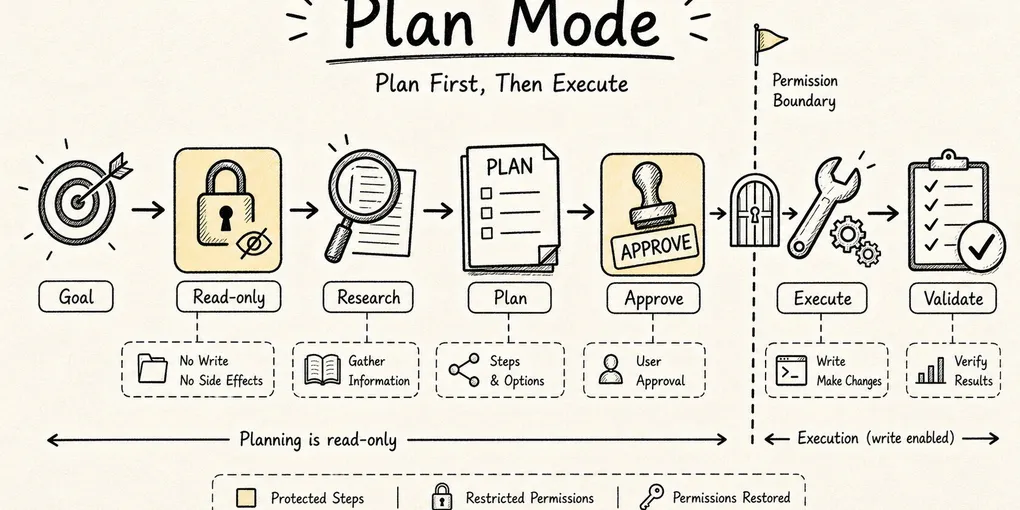
What makes Claude Code interesting is that it turns “think before acting” into a runtime mechanism:
User goal
-> enter Plan Mode
-> switch to read-only permissions
-> gather repository context
-> generate an approvable plan
-> user approves
-> restore the previous permission mode
-> enter execution
-> implement and verify the plan
Plan is not just a more polite prompt. It is a control layer built out of tools, permission modes, state persistence, subagents, approval UI, plan files, and recovery logic.
That is what this article unpacks.
At the source level, the first thing to notice is that plan is an explicit PermissionMode enum in Claude Code. It sits alongside default, acceptEdits, bypassPermissions, and auto. It has its own title, short title, icon, color, and external mapping. In other words, Plan is not a temporary flag bolted onto one tool. It is a runtime mode that participates in the entire permission decision chain.
1. Plan Solves Premature Action, Not a Failure to “Write a Plan”
The most dangerous moment for a coding agent is often not when it changes the wrong line. It is when it starts changing anything before it really understands the project.
Suppose you ask it to add pagination to an API. It might immediately introduce page and pageSize, patch a few handlers, and only afterward discover:
- The project already has a standard response envelope.
- The data layer uses Prisma.
- Existing endpoints lean toward
limit/offset. - Validation is standardized around Zod.
- Some list endpoints are better served by cursor pagination.
- The change has to stay compatible with existing frontend calls.
If the agent has already written a pile of code, those discoveries turn into rework. If it is still in a read-only phase, they are just planning inputs.
So the core question behind Plan Mode is not:
How do we make the model produce a beautiful plan?
It is:
How do we give the agent a legitimate phase where it can fully understand the project without creating side effects?
Claude Code answers by splitting the work into two stages:
Plan stage: read code, search context, compare options, ask questions, output a plan
Execute stage: write files, run commands, change code, verify results
At the most basic level, Plan Mode is a read/write separation mechanism.
2. The Entry Point: EnterPlanModeTool Turns “Planning” Into a State Transition
In Claude Code, entering Plan Mode does not merely change the tone of the model. It triggers a runtime state transition through EnterPlanModeTool.
This is the main session entering Plan Mode, not the separate built-in Plan subagent discussed later.
From the implementation path surfaced in the source walkthrough, the flow looks roughly like this:
The user or model decides to enter Plan Mode
-> check whether the current context is a subagent
-> save the pre-Plan permission mode into prePlanMode
-> prepare a permission context for Plan Mode
-> switch the current permission mode to plan
-> return instructions describing how to behave in Plan Mode
Closer to the source, EnterPlanModeTool declares itself with shouldDefer: true, isConcurrencySafe: true, and isReadOnly: true. When invoked, it reads the current AppState, prepares a permission context through prepareContextForPlanMode(prev.toolPermissionContext), and then applies applyPermissionUpdate(..., { type: "setMode", mode: "plan", destination: "session" }) to move the session into Plan Mode.
The tool result sent back to the model may say things like “explore the codebase, design an implementation, do not write or edit files.” But that outer instruction text is not the real enforcement point. The hard switch happens when toolPermissionContext.mode = "plan".
Two details matter here.
First, prePlanMode.
Plan Mode is temporary. Before entering it, the session may be in default, auto, acceptEdits, or something else. Once planning is complete, Claude Code needs to return to the original execution context, so it saves the previous mode first.
That sounds ordinary, but it is easy to get wrong. If you fail to preserve the original mode, the session may exit Plan and come back with the wrong permission posture. An agent that used to ask every time might suddenly run in a more automatic mode, or the reverse.
Second, the subagent restriction.
The source behavior here makes it clear that subagents should not enter Plan Mode on their own. The reason is simple: Plan Mode eventually needs user approval. If a hidden child agent raises a plan approval request halfway through a background task, the parent agent gets stuck and the user has no idea which plan they are even being asked to approve.
That tells you how Claude Code thinks about Plan. It is not a generic “thinking switch” that any agent may toggle whenever it likes. It is a control surface for the main workflow.
3. The Hard Boundary: the Permission System Blocks Writes
One of the easiest things to underestimate about Plan Mode is that it really does change tool permissions.
Inside the permission model, plan is a distinct mode. Its meaning is not “please avoid editing.” Its meaning is “non-read-only tools should not pass permission checks.”
You can think of the permission pipeline like this:
A tool call enters the permission pipeline
-> are we currently in Plan Mode?
-> if the tool is not read-only, reject it
-> if it is a read-only tool such as Read, Grep, or Glob, continue through normal checks
In other words, “do not act yet” is upgraded from a prompt guideline to a runtime rule. Even if the model wants to write, it cannot.
So during Plan Mode, the agent can do things like:
Read: inspect key files
Grep: search for existing patterns
Glob: discover project structure
LS: understand the directory layout
Restricted Bash: perform exploratory observation under the current version and policy
AskUserQuestion: clarify choices
ExitPlanMode: submit the plan for approval
But it should not do things like:
Edit / Write: modify files
NotebookEdit: change notebooks
Mutating Bash / network / external writes that create side effects
Subflows that create approval confusion
That is the core difference between Plan Mode and an ordinary “please think first” prompt. A prompt can only ask for self-restraint. Plan Mode narrows the tool surface itself.
There is one nuance worth calling out. Different Claude Code documents and versions do not describe Bash in exactly the same way during Plan Mode. Some say shell commands can still be used for exploration. Others summarize the phase more broadly as “not executing commands.” The safer interpretation is that the real boundary is not whether the tool named Bash appears or disappears. The real boundary is whether the command introduces a mutating side effect.
So in production, do not assume Bash is categorically forbidden. Inspect the actual filtered tool list.
The newer Plan-agent prompt makes this clearer. It allows read-only exploratory commands such as ls, git status, git log, git diff, find, cat, head, and tail, while explicitly forbidding commands such as mkdir, touch, rm, cp, mv, git add, git commit, npm install, and pip install, all of which modify the workspace or environment.
So the most accurate summary of Plan Mode’s boundary is:
Exploration may continue.
Changes must wait for approval.
That boundary is enforced jointly by each tool’s checkPermissions, the permission chain, the Plan-agent prompt, and the approval step when exiting Plan Mode. It is not a one-line “disable Bash” rule.
4. The Plan Subagent: Isolating Research Context
Claude Code’s public documentation adds another important layer. During Plan Mode, if Claude needs to understand the repository, it can delegate that research to a built-in Plan subagent.
That Plan subagent has several defining traits:
- It inherits the main session’s model.
- It uses an isolated context window.
- It can use only read-only tools.
- Its job is to gather repository information before planning.
- It cannot keep recursively spawning unrestricted child agents.
This solves another common problem in agent systems: context contamination.
If the main thread performs every search, opens every file, records every dead end, and keeps all that material in one context, the planning conversation becomes long and noisy before the plan is even written. The Plan subagent acts more like a researcher. It goes into the codebase, collects evidence, and reports back. The main thread stays cleaner and can focus on aligning with the user and synthesizing the final plan.
You can think of the roles this way:
Main agent: understand the goal, communicate with the user, synthesize the final plan
Plan subagent: do read-only research, collect evidence, discover patterns
Permission system: guarantee that the research phase does not create side effects
This is a restrained design. Claude Code does not turn Plan into some mysterious central planner, nor does it expose a fixed plan AST. The architecture is closer to this:
The main thread decides, the Plan subagent investigates, and the permission system provides guardrails.
At the source level, it is also important to distinguish two separate things. Main-session Plan Mode is a permission-state transition. The built-in Plan agent is an agent definition. In that definition, tools such as Agent, ExitPlanMode, Edit, Write, and NotebookEdit are disabled so the subagent behaves like a read-only researcher rather than another implementation worker.
5. ExitPlanModeTool: Leaving Plan Is More Complex Than Entering It
Entering Plan Mode mainly means switching into a read-only phase. Exiting it involves more moving parts.
ExitPlanModeV2Tool carries at least four responsibilities:
1. Receive the plan content produced by the agent
2. Present that plan to the user or team lead for approval
3. Restore the permission mode that was active before Plan Mode
4. Save plan material for later execution, recovery, and verification
The most interesting detail is the permission restore path.
Suppose the session was in auto before entering Plan Mode. Under normal conditions, once the user approves the plan, Claude Code should restore auto so execution continues under the same automation posture as before.
But there is a time window to worry about:
Auto mode is available when Plan begins
-> the agent spends fifteen minutes researching in Plan Mode
-> during that time, the auto gate is closed by a safety policy or circuit breaker
-> the agent exits Plan
If the system blindly restores the old mode without rechecking, it may bring the agent back into a level of automation that is no longer safe.
So ExitPlanMode restores defensively. If the previous mode was auto but the current auto gate has since been closed, the system falls back to a more conservative default mode instead.
That small detail tells you Plan is not just a thin “click continue” UI. It is part of a permission-aware runtime state machine.
Another easy point to miss is that ExitPlanModeV2Tool itself is not read-only, because it writes the plan to disk. This is a controlled write that belongs to the Plan workflow. It does not mean the Plan phase is free to edit arbitrary project files. On exit, the tool reads the submitted plan or the existing plan on disk, writes back any edits the user made in the approval UI, restores prePlanMode, and clears that temporary field.
In an ordinary main session, leaving Plan requires user interaction. In a team scenario, if the current context is a teammate rather than the main thread, the exit request may not open a local UI at all. Instead, it can be written into the team lead’s mailbox as a plan_approval_request, where it waits for approval before implementation continues.
6. A Plan Is Not Temporary Text. It Is a Recoverable Execution Artifact
Plan Mode also includes a very practical engineering decision: the plan cannot live only inside a chat bubble.
The user has already spent time approving it, and the agent has already spent tokens researching it. If the session crashes, resumes remotely, or gets compacted and the plan disappears, the execution phase loses its basis.
So Claude Code treats the plan as recoverable runtime material.
By default, plan files live under ~/.claude/plans. If settings specify plansDirectory, the code resolves it as a path relative to the project root and checks that it cannot escape that root. The plan file name is derived from the session slug: the main session uses {planSlug}.md, while agent-specific cases append -agent-{agentId} to prevent one execution context from overwriting another.
The recovery logic described in the source walkthrough suggests a three-layer strategy:
Layer 1: read the plan file directly
Layer 2: recover it from a transcript file snapshot
Layer 3: recover plan content from message history
Inside message history, several different traces may preserve the plan:
The tool_use input to ExitPlanMode
The planContent field in a user message
The plan_file_reference preserved by auto-compact
The underlying idea is straightforward. Once the user approves a plan, it is no longer just natural-language advice. It becomes the contract for execution.
The execution phase needs to know:
- What goal was approved at the time.
- Which steps were explicitly in scope.
- Which files were expected to change.
- Which risks were already called out.
- Which plan a resumed session should continue from.
That is the second essential nature of Plan Mode: it upgrades a plan from conversational text into a recoverable runtime object.
This is easy to overlook when building agent systems yourself. It is tempting to think, “The plan is already in the message history, so we are fine.” But once context is compacted or truncated, that plan may vanish, and the agent begins improvising in execution.
Resume and fork are both folded into the same lifecycle. On resume, the system can inspect historical logs for the slug, read the original plan file, and if the file is missing in the remote environment, rebuild it from a file snapshot or message history. On session fork, Claude Code generates a new slug and copies the original plan file so changes in the fork do not overwrite the parent session’s plan.
7. Verification Hooks: the Executor Should Not Be the Only Judge
The last piece of Plan Mode is verification.
The source walkthrough also mentions registerPlanVerificationHook, which is registered around ExitPlanModeV2Tool so the system can check after execution whether the actual result matches the approved plan.
One detail matters: the hook needs to be registered after context clearing, because clearing context removes existing hooks. Register too early and the verification logic disappears before it can do any work.
Why separate verification at all?
Because when the implementation agent judges its own work, it is easy for it to decide, “I think I finished,” based on the path it personally followed. That does not guarantee a line-by-line comparison against the approved plan.
A verification agent or verification hook behaves more like a review layer:
Read the approved plan
-> inspect the post-execution changes
-> compare every planned item
-> mark completed items, deviations, and omissions
-> send the verification result back to the main flow
That turns Plan into more than a ceremony before execution. It becomes the standard used to evaluate the work afterward.
8. One End-to-End Flow: Adding Pagination to a REST API
Keep using the same example: add pagination to a REST API.
Without Plan Mode, the agent might jump straight into this:
Create pagination.ts
Modify the users route
Change the response shape
Run tests
That looks efficient, but the risk is obvious: the agent may still be guessing about the project’s conventions.
With Plan Mode, the chain looks like this:
User: add pagination to the REST API

Claude Code:
1. Recognize that this is a multi-file implementation task and enter Plan Mode
2. Save the current permission mode to prePlanMode
3. Switch to plan permissions and allow only read-only exploration
4. Search existing endpoints, response types, validation middleware, and ORM usage
5. Delegate repository research to the Plan subagent if needed
6. Compare offset and cursor-based approaches
7. Submit the plan through ExitPlanMode
8. Wait for user approval
9. Restore the previous permission mode
10. Implement the code according to the plan
11. Run tests
12. Verify that the real changes match the approved plan
The real value is not Step 7 by itself. It is the way the surrounding mechanisms lock together:
Read-only research prevents reckless edits
Permission switching enforces the boundary
User approval keeps the task aligned
Plan persistence makes the workflow recoverable
Verification hooks keep execution from drifting away
That is what Plan Mode actually means.
9. How Plan Relates to Agent Collaboration and Sandboxing
Its connection to agent collaboration is that the Plan subagent is one built-in form of Claude Code’s broader agent division of labor. It is not a general executor. It is a research role dedicated to the planning phase. Its isolated context reduces contamination in the main thread, and its read-only toolset limits side effects.
Its connection to sandboxing is different. Plan Mode answers “when is the system allowed to act?” Sandboxing answers “once it is allowed to act, what can it touch?”
You can roughly divide the pieces like this:
Plan Mode: before execution, constrain behavior first
Permission: at each tool call, decide ask / allow / deny
Sandbox: for commands and file access, constrain the blast radius
Subagent: in complex tasks, isolate context and responsibility
Hook: at lifecycle boundaries, add checks and automation
Together, these mechanisms are what make Claude Code feel less like “a model that can call tools” and more like a real agent harness.
10. If You Built Your Own Plan System, What Is the Smallest Useful Version?
If you abstract Claude Code’s design without copying it literally, a minimum viable Plan system still needs at least five things.
First, an explicit mode.
mode = normal | planDo not rely on prompt wording alone. The runtime state must explicitly know whether it is currently in the planning phase.
Second, a read-only tool set.
plan mode:
  allow: Read, Search, List, SafeInspect
  deny: Write, Edit, Delete, MutatingShell
Third, an approval point for exit.
ExitPlan(plan)
-> show plan to the user
-> approve / reject / revise
Fourth, plan persistence.
plan.md
message.tool_use.input.plan
resume snapshot
At minimum, a resumed session must still be able to find the plan the user approved.
Fifth, post-execution verification.
approved_plan + actual_diff + test_result
-> verification report
Without verification, a plan easily degenerates into a wish list written at the top of the session.
Summary
Claude Code’s Plan feature is not simply about generating a plan. It is closer to a control plane for governing agent behavior in stages.
In one sentence:
Plan Mode upgrades “understand first, act second” from a model preference into a runtime institution.
Its design can be compressed into five phrases:
Read-only exploration
Permission switching
Subagent research
User approval
Plan persistence and verification
If you view Claude Code as an agent harness, the purpose of Plan Mode becomes very clear. It is not there to make plans look nicer. It is there to make complex work align before execution, stay traceable while it is happening, and remain recoverable when something goes wrong.
That is one of the clearest lines separating a modern coding agent from an ordinary chatbot.